Networked Attached Storage
I had a hard drive fail when moving my PC to my dorm for my first semester at college. I realized the importance of data validity when I almost lost all of my work from high school. Luckily I was able to recover it. While looking for data redundancy practices I discovered NAS devices. They seemed perfect. While I could buy one, it would be cheaper and cooler to build exactly what I wanted. It would also give me the opportunity to build my own computer which was a long-time dream of mine.
While building the NAS, the case scraped my mom's dining room table. This may be why she never understood how cool it was.
Starting
I ordered most of my parts through Best Buy or Amazon based on price and availability. The list of parts came from a NAS guide I found online. I ordered two ten-terabyte hard drives to run in RAID1 with TrueNAS running on an old SSD I had lying around.
On December 17th, 2021, all my parts had arrived and I was ready to build my first computer.

Building
The process seemed simple enough. Building a computer is like putting together a puzzle. Everything clicks into place perfectly and then you turn it on. Except my computer wasn't turning on.
Now before running to my room and crying, I tried to troubleshoot the problem. I was fairly confident that I hadn't broken anything while assembling the computer. I knew that fans had specific pins on the motherboard that were clearly labeled. The pins for the power button though, I just put in the general area where they belonged. I didn't take the time to see that each connector was labeled and had to be in a specific spot. I looked through the manual and found the correct configuration. I redid it, crossed my fingers, and pressed the power button to see a beautiful BIOS screen.

2/16/24 Note:
I was reviewing this project and saw that I called TrueNAS OS user friendly. I don't think any sane person has ever called it that.
The screen I used came from an old laptop that died. I learned you could repurpose them from an LTT video.
2/16/24 Note:
I turned off the Webdav share when I upgraded the networking in my house. The Nighthawk app showed me how often it came under attack from people trying to get into my network.
TrueNAS OS
TrueNAS looked user friendly, it was free, and it did what I needed it to do. I created a boot drive on a USB and installed the OS onto the NAS.
There is no GUI for TrueNAS. When its loaded there's just text. You access the GUI on your network by going to the designated address.

I created one big pool with my hard drives and then made a SMB share. SMB shares are shares visible on your network to Windows computers. I opened file explorer on my laptop, clicked Network, and then TRUENAS where I was able to login. Nine terabytes of useable data stored in RAID1. I tried explaining to my family why this was so cool but they didn't understand. Then I created a Webdav share to access my files from outside my home network. This just works with small things though like pdfs or images.
Plugins
Plex was the only plugin I needed for the moment. It was relatively simple to setup. Once running, I could access my photos and videos stored on the NAS from anywhere I had internet.
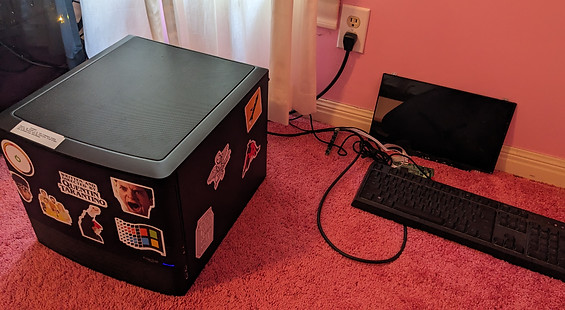
I promised these cables are managed the best they can be. I also dusted after this photo.
Yes, I know the carpet blocks airflow. Don't worry, no fires yet.
Troubleshooting & Upgrades
Unfortunately, it wasn't perfect. The system would randomly crash and I would see "Fatal Trap 12" appear when trying to boot up. A quick Google search told me that it was most likely a CPU or RAM problem. Noooo!!!! Not having money or time, I went back to school, unable to get the time to work on it until the Summer of 2023.
The first week of Summer I committed to fixing the problem before my internship started. I wasn't going to buy a new CPU just to see if that would work. I saw that on the web interface, I could only see stats on only one of the CPU threads. I put Ubuntu Linux on a USB and used it as a boot drive. From there I used the grub menu to get a CPU tester. Linux usually makes me want to cry but the CPU test showed all threads operating properly so I was actually happy to have used it.
After a quick RAM test, I determined that it had to be a software problem. I switched the SSD I was booting from to a laptop hard drive with the latest version of TrueNAS. I was still getting the problem. It occurred to me that I had never updated my BIOS settings. 20 minutes later, the NAS booted perfectly and all CPU threads were visible in the web interface.
I celebrated the victory by buying two more ten terabyte drives to expand my storage space. Bringing my total to 20 terabytes configured in RAID1.

Counting the boot drive, I had five drives and only 4 SATA ports. A PCIEX1 to SATA x4 port adapter I found on Amazon remedied this.

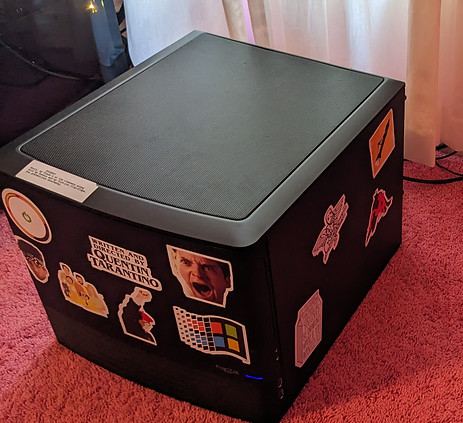
The Max Fischer and Spider-Man stickers increase read and write speeds by 5%.
Results
My NAS is working out great. I have enough storage for everything I need. It holds old school work, Blender renders, home videos, and projects I work on. I'm not constantly worrying about a single hard drive failing and losing papers I spent days on or memories with friends. My wallet also prefers the NAS over renting this much server space.
I got to build my own computer, learned how to use a new operating system, and solve a niche problem.